Built by a developer who got tired of 10,000 unread emails.
Let AI keep your inbox clean
Thousands of unread emails? Caspian archives what's no longer relevant — automatically, every day.
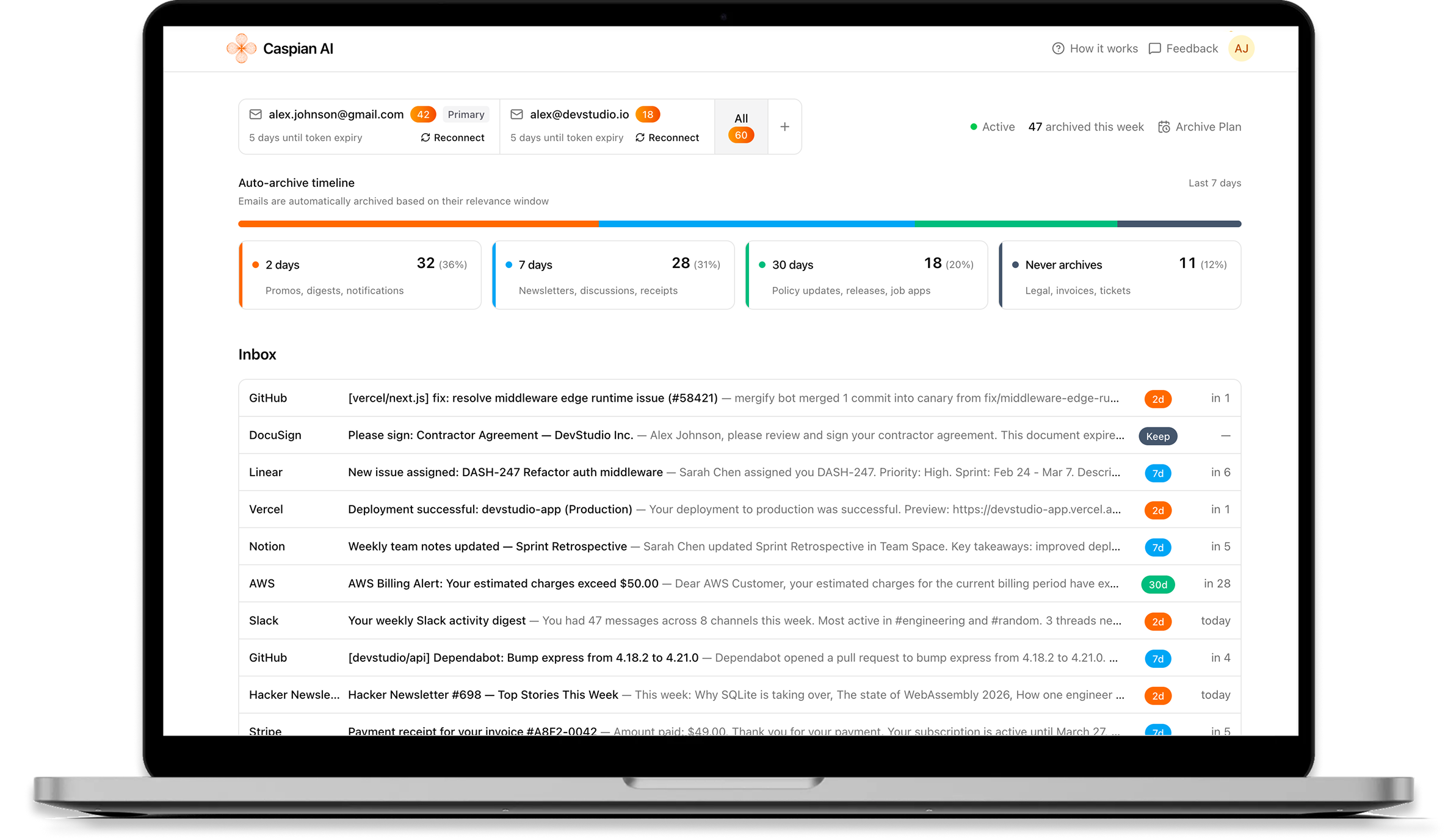
Two steps to inbox zero
Clean Up, Then Stay Clean
Caspian works in two phases. First tackle your backlog, then keep it from coming back.
Inbox Cleanup
Connect your Gmail and run a one-time deep clean. AI figures out which emails are still relevant and which aren't.
- AI classifies every email by its relevance timeline
- Review the results before anything happens
- Archive emails that's no longer relevant in one click
- Important emails like contracts are never touched
Automated Management
Once your inbox is clean, Caspian keeps it that way. Automatically, every day.
- New emails are classified and archived as they expire
- No rules or filters to configure
- Works quietly in the background
How Caspian AI Works
Connect Gmail
Secure OAuth connection with read and modify permissions. You control when to enable the service and can turn it off anytime.
AI Classifies
Recognizes that emails are temporarily important with different lifespan. Uses context-aware AI to classify emails based on their importance timeline.
Auto-Archive
We archive emails after their relevance period expires (2 days, 7 days, 30 days, or event-based). Important emails like invoices and contracts are classified to never be archived.
Full Control
You can review all classifications before archiving, override any decision, or turn the service on or off anytime. You maintain complete control.
Why Caspian AI
Smart Email Management for Busy Inboxes
Focus on what matters. Let AI handle the email clutter.
Privacy-First
We only read email headers and metadata, never full content. Your emails stay private and secure.
Safe by Default
Soft-archive only - nothing is permanently deleted. You review classifications before archiving and maintain full control.
AI-Powered
Context-aware classification understands intent, not just keywords. Analyzes sender, subject, and timing to determine lifespan.
Zero Maintenance
Runs automatically in the background. Set it and forget it. No manual rules or filters to configure.
Built for Busy Inboxes
Handles newsletters, product updates, notifications, and routine emails that pile up fast - so your inbox doesn't.
Transparent
See exactly what gets archived and when. Full visibility into all classifications and archive schedules.
Your Privacy Matters
We built Caspian AI with privacy and security as core principles. Your email data is handled with the utmost care and transparency.
Gmail OAuth Security
We use Google OAuth for secure access with read and modify permissions (needed for archiving). You control when to enable the service and can turn it off anytime.
Encrypted Token Storage
All Gmail OAuth tokens are encrypted at rest using AES-256-GCM encryption. Your credentials are never stored in plain text.
Metadata Only Processing
We only process email headers and metadata (sender, subject, date). We never read or store the full content of your emails.
You Control Your Data
Turn the service on or off anytime. Disconnect your Gmail or delete your account directly from your dashboard.
FAQs
Frequently Asked Questions
Everything you need to know about Caspian AI
What types of emails does Caspian AI archive?
Caspian AI recognizes that most emails are temporarily important with different lifespan. It focuses on emails like notifications, newsletters, product updates, and routine communications that lose relevance over time. Important emails like invoices, personal messages, and alerts are never archived. The AI uses context-aware classification to determine the right horizon for each email.
Is my email data secure?
Yes. We use Gmail OAuth for secure access with read and modify permissions (needed for archiving). All OAuth tokens are encrypted with AES-256-GCM encryption. We only process email headers and metadata (sender, subject, date), never full email content. Your emails stay private and secure.
How does the AI classification work?
Caspian AI uses OpenAI to analyze email context including sender, subject, snippet, and timing to determine each email's temporary importance. The system assigns emails to different horizons (2 days, 7 days, 30 days, event-based, or never archive) based on when they lose relevance. You can review and override any classification before archiving.
When will Caspian AI be available?
Caspian AI is currently in early access. We are working with a limited set of users to refine the product before public release. Join our early access program and help shape the future of email management.
Can I use Caspian AI with multiple Gmail accounts?
Yes, Caspian AI supports multiple Gmail accounts. You can connect multiple accounts and manage them all from a single dashboard. Each account is processed independently with its own classification and archiving settings.
Ready for a clean inbox?
Join early access and let Caspian handle the clutter. We're onboarding a small group of users — spots are limited.